Foam Maker Studio
User Guide
Make G-code for your hot-wire foam cutter, check it, and run it on the machine.
For Foam Maker Studio on the website. October 2026.
Contents
- Getting going
- What it is, and getting started
- Safety first
- Two ends of one wire
- Making G-code
- Cut a shape
- Wings: a different shape at each end
- The foam designer
- The simulator
- Running it on your foam cutter
- Send to machine
- When something is wrong
- Problems and fixes
- Quick reference
1What it is, and getting started
Foam Maker Studio makes G-code for hot-wire foam cutters that run GRBL or a board like it (grblHAL, FluidNC, GRBL Mega 5X). A hot wire is pulled through a block of foam and melts its way along; there is no depth and no tool to change, only where the wire goes and whether it is hot.
- Cut a shape: an SVG drawing, a picture traced to its outline, or a NACA wing section, cut out of the block.
- The foam designer: draw your own on the block, with a drawing for each end of the wire if you want one.
- The simulator: plays any foam file back at both ends of the wire, so you see what the machine will do first.
- Send to machine: connects to your foam cutter over USB, from the browser, and runs the job.
Everything runs on your own computer. Your drawings and pictures are not sent anywhere.
Your account
- Sign in with your free 3d-lithophane.com account. Every tool needs it; this guide does not.
- While Foam Maker Studio is new it is open to our beta testers. The Beta Testing menu says how to become one.
The usual order
- Make the G-code: Cut a shape for a file or a wing section, or the designer to draw it.
- Press Watch it run to see it in the simulator, at both ends.
- Cut a test on a scrap of the same foam, to find the heat and the speed.
- Press Send to machine: connect, set the zero beside the block, and run it.
2Safety first
- Only cut foam that is meant for it: polystyrene (EPS, XPS) and polyethylene foam. Never cut PVC foam: it gives off hydrochloric acid.
- Too much heat makes a wide, stringy cut and more fumes. Use the least heat that cuts cleanly at your speed.
- Stay with the machine while it runs. A wire standing still while hot melts a hollow, and a snapped wire can whip.
- Try it on scrap first. There is no table of right heat and speed here on purpose: the foam, the wire and its length decide it.
3Two ends of one wire
The wire runs between two towers, one at each end of the block. X moves the wire left and right, Y up and down. The machine has four motors, each on its own: X1 and Y1 at one tower, X2 and Y2 at the other, and all four can move separately. In the file they are X1 = X, Y1 = Y, X2 = Z, Y2 = A, so each end can cut a different shape: tapered, swept, twisted, or a drawing of its own.
The letters for X2 and Y2 can be changed on every page, to match your board. They are kept in this browser.
Four axes need a board with four: grblHAL, FluidNC or GRBL Mega 5X. GRBL 1.1 on an Arduino Uno has only three (X Y Z).
Making G-code
4Cut a shape
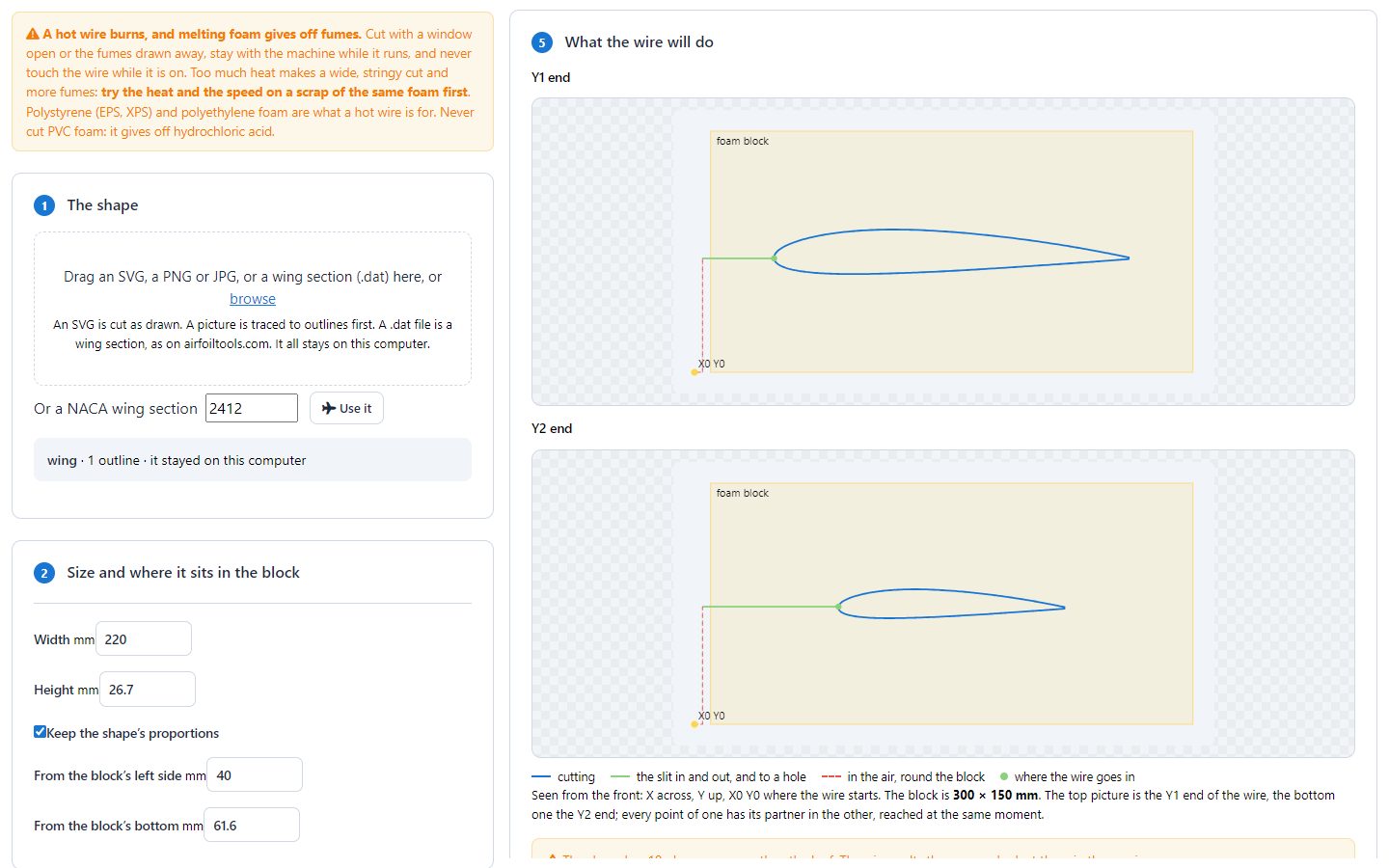
- The shape: drop an SVG, a PNG or JPG picture, or a
.datwing section on the page, or type a NACA number and press Use it. Only closed outlines are cut: a line that does not go all the way round is left out, and the page says so. - A picture is traced to its outline first. Move the slider until the outline is the one you want.
- Size and place: the width and height in millimetres, and where it sits in the block, from the block's bottom-left corner.
- The Y2 end: the same as Y1, changed by numbers, or a drawing of its own. See chapter 5.
- Block and machine: the block's size and where its left side and bottom are on the machine; the
motors and their letters; the heat (
S), the warm-up time, the speed in the foam and in the air, and the kerf. - The previews: the wire's whole way at each end. Then download the file, watch it run, or send it.
How the wire gets in and out
- The wire starts and ends at X0 Y0, beside the block (left of it, level with its bottom or below).
- Between shapes it goes round the outside of the block, never under it.
- It goes in to each shape along a thin straight slit from the nearest side, round the shape, and back out along the same slit. A hole is reached by a slit from the outline.
- Kerf: the width the hot wire melts away. Half of it is allowed for outside the outline (and inside a hole), so the part comes out the size you drew. Cut a 50 mm square and measure it to find yours.
5Wings: a different shape at each end
A model aircraft wing is usually smaller at the tip than at the root. Put the root at the Y1 end and the tip at Y2.
Changed by numbers
- Chord: the tip's length as a share of the root's, for example 60%.
- Thickness: the tip thicker or thinner.
- Raise (dihedral) moves the tip up, sweep moves it back, and twist (washout) turns it, about the point you choose.
A drawing of its own
Load a second file for Y2, or draw it in the designer. The two drawings are matched shape for shape, by where they are, so they need the same number of shapes and holes. Each outline is followed from its right-most point (a wing's trailing edge) at both ends together, so the two ends arrive at their corners at the same time.
6The foam designer
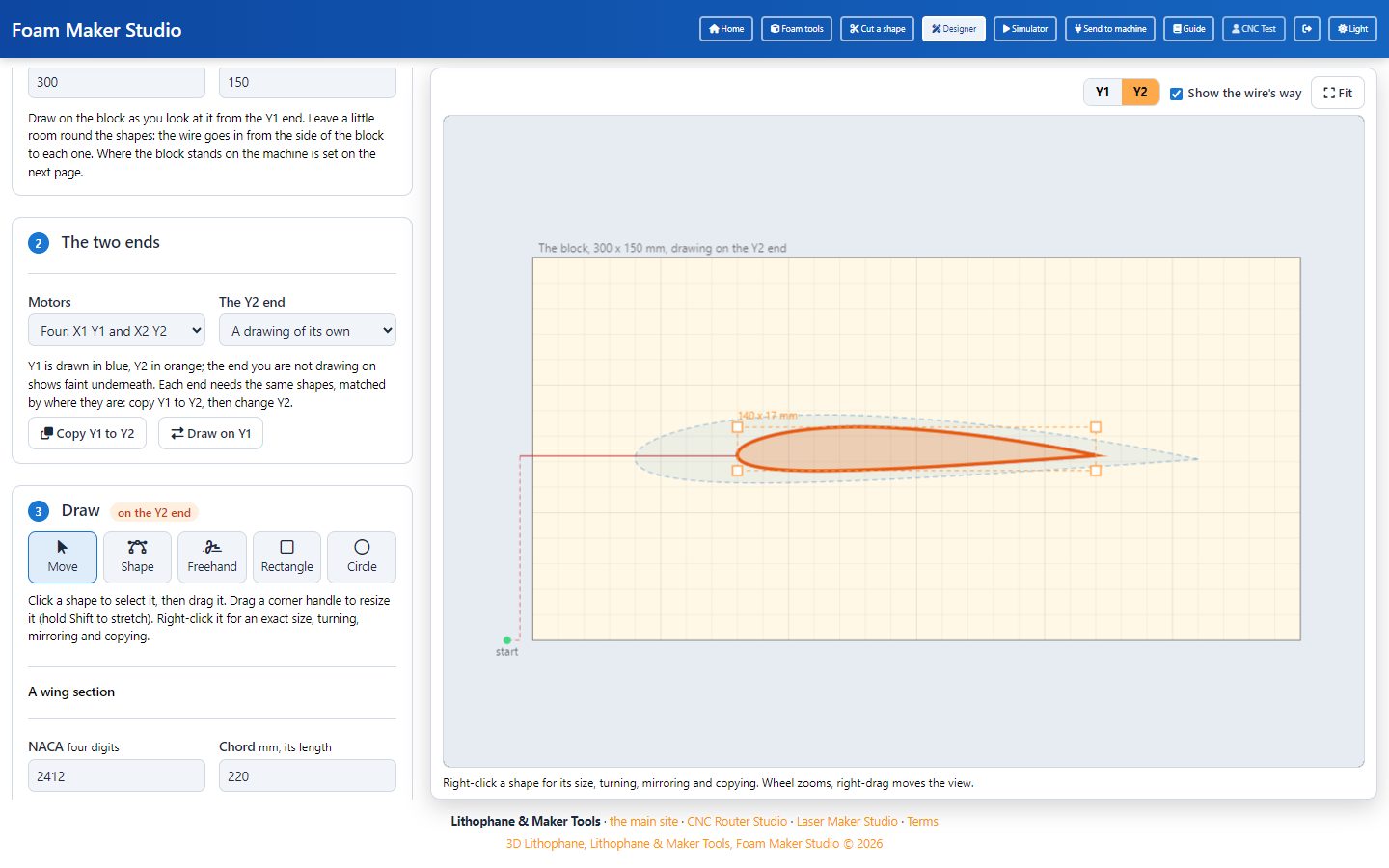
- The block: its width and height. Draw as you look at the block from the Y1 end.
- The two ends: your motors, and whether Y2 is cut the same as Y1 or has a drawing of its own.
- Draw: shapes point by point, freehand, rectangles and circles; a wing section (NACA or a
.datfile) at the chord you give; text; or an SVG. - Make the G-code opens Cut a shape with your drawing in it, for the heat, the speed, the previews and the file.
- Move a shape by dragging it; drag a corner handle to resize it (hold Shift to stretch it).
- Right-click a shape for an exact size, a copy, a quarter turn, a mirror, the middle of the block, or a copy at the other end.
- For a tapered wing: add the wing section, choose A drawing of its own, press Copy Y1 to Y2, then make the Y2 copy smaller and move it back.
- The red line is the wire's way at the end you are drawing on. The page warns when a shape cannot be reached without cutting through another one.
- Your drawing is kept in this browser until you press Start again.
7The simulator
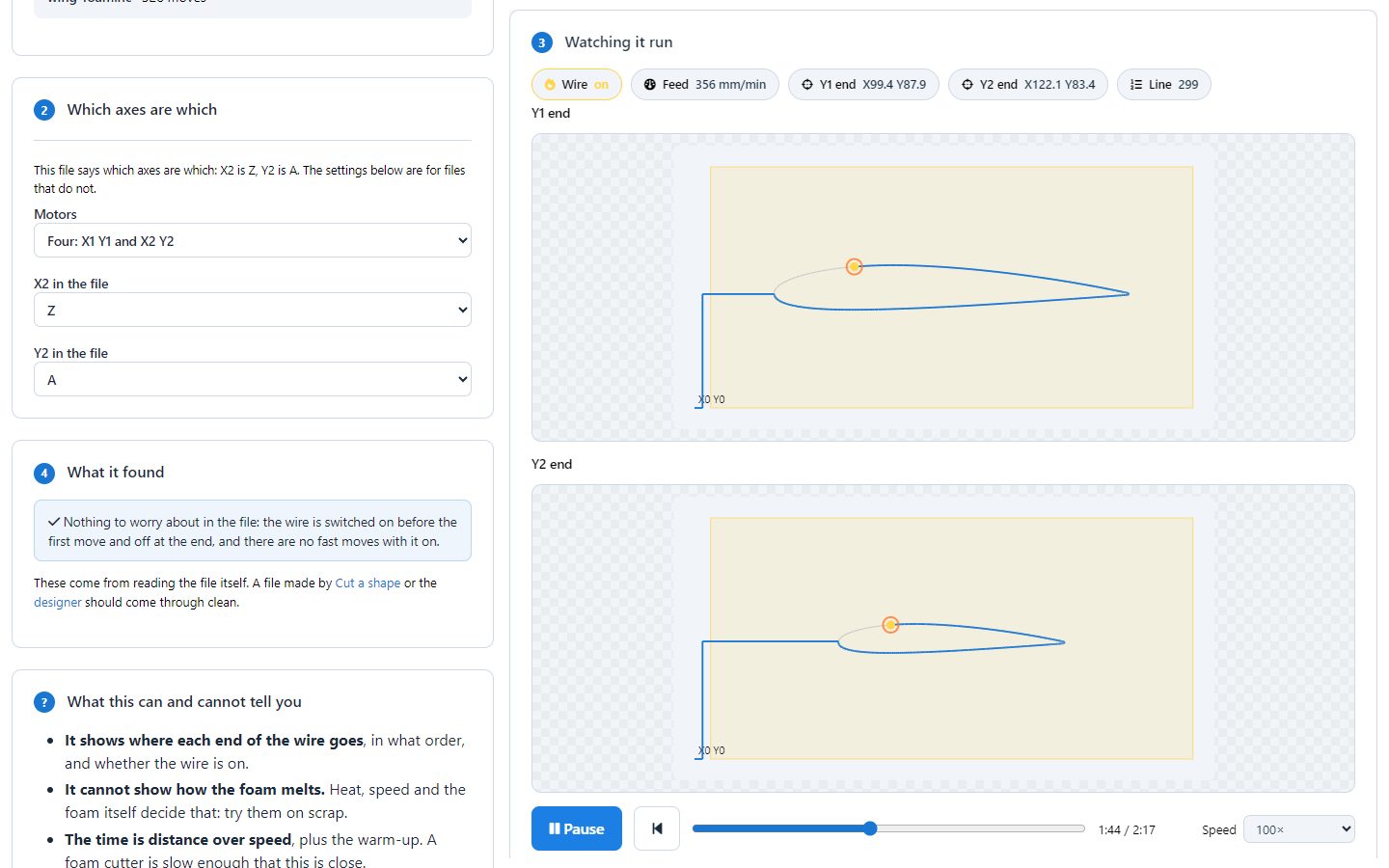
Drop any G-code file on it, or press Watch it run on Cut a shape. It reads the file itself, not the plan that made it, so it is a real check of any foam file.
- Play, drag the slider, and choose the speed. The chips show the wire on or off, the speed, where each end is, and the line of the file.
- What it found: arcs (a foam cutter wants straight lines), fast moves with the wire hot, a file that never switches the wire off, or axes that are not set up.
- A file made here says which letters its ends use. For any other file, choose them in step 2.
- The time is the distance over the speed, plus the warm-up.
Running it on your foam cutter
8Send to machine
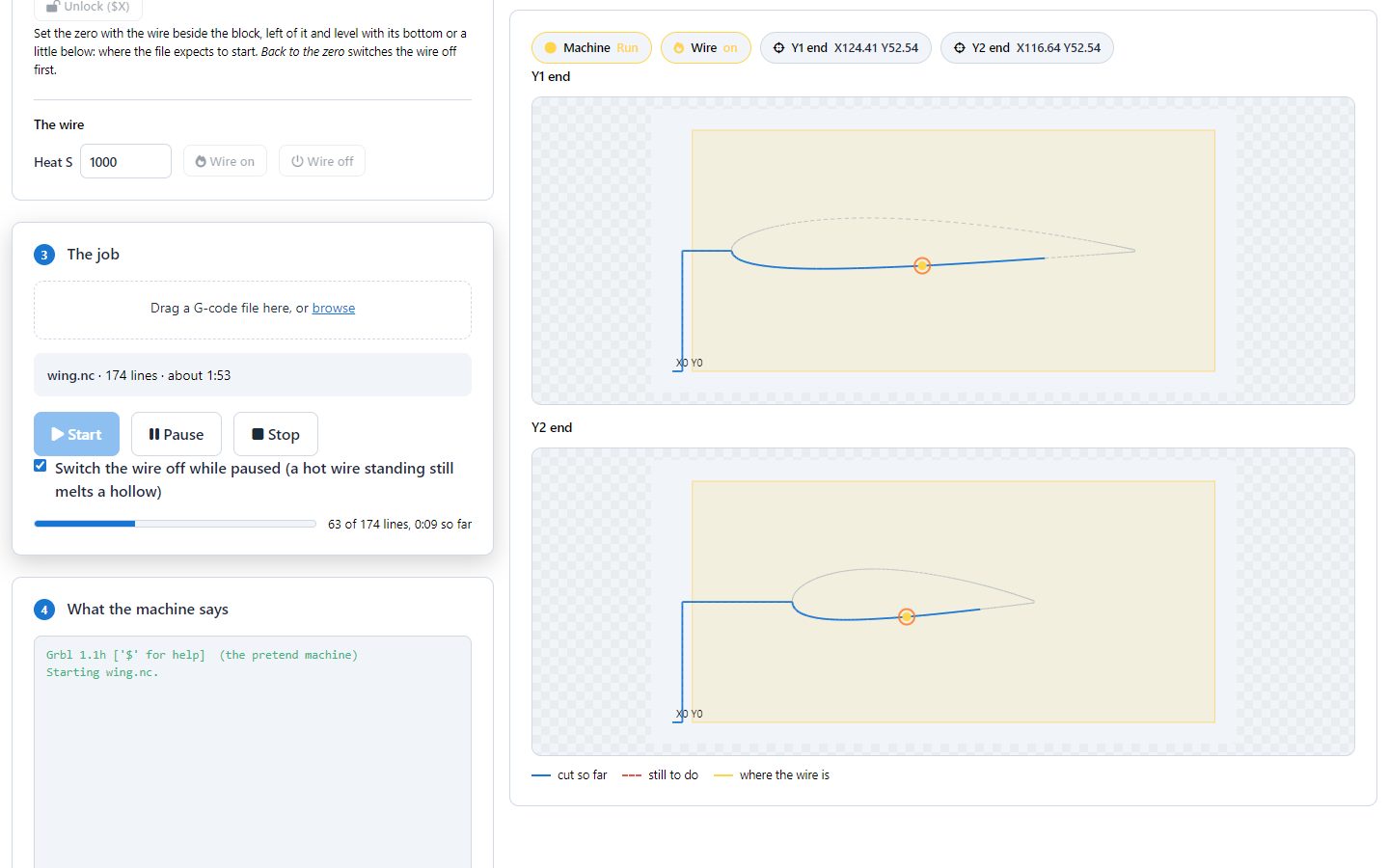
Chrome or Edge on a computer, with the machine on a USB cable. Nothing to install. Try everything first with Try it with a pretend machine.
- Connect: the port speed (usually 115200), your motors and their letters, then Connect the machine and choose the port.
- Move the wire with the arrows: both ends, or one end only to line the wire up. Choose how far each press goes and how fast.
- Set the zero with the wire beside the block, left of it and level with its bottom or a little below, and press The zero is here.
- Try the heat: Wire on and Wire off.
- The job: drop the file, or come here from Cut a shape. Start runs it; Pause holds it (and switches the wire off while it waits, unless you untick that); Stop resets the board at once.
$32=0. In laser mode GRBL turns the wire off
while it waits, which leaves a hollow when it comes back on.When something is wrong
9Problems and fixes
| What you see | What to do |
|---|---|
| The cut is wide and stringy | Less heat, or a little faster. |
| The wire drags and bends, the cut is curved | More heat, or slower. Check the wire is tight. |
| Parts come out too small or too big | Measure your kerf (cut a 50 mm square) and set it. |
| The tip end melts more than the root | The tip moves slower, so it gets more heat. Keep the tip at least half the root's size, or cut a little faster. |
| "The way in has to cut through another part" | Move the shapes apart so each one can be reached from the side of the block. |
| "They have to match, one for one" | Y1 and Y2 need the same number of shapes and holes. Copy Y1 to Y2 and change the copy. |
| Y2 does not move (Send to machine) | Check the letters: X2 and Y2 must be axes your board has. GRBL 1.1 has only X Y Z. |
| The wire does not heat | The wire is switched by the board's spindle output (M3/M5)
through a relay or a power controller. Check that wiring, and that $32=0. |
| No port in the list | Use Chrome or Edge on a computer. Check the cable and close any other sender. |
| Alarm | Press Unlock ($X). Home it if it may have lost its place. |
Still stuck? Write to support@3d-lithophane.com.
10Quick reference
Keys in the designer
| Key | What it does |
|---|---|
| V L F R C | Move, Shape, Freehand, Rectangle, Circle |
| Delete | Delete the selected shape |
| Ctrl+Z | Undo |
| Esc | Drop the shape being drawn |
| Wheel, right-drag | Zoom, move the view |
The G-code
| Word | Meaning |
|---|---|
M3 S1000 | The wire on, at heat 1000 if your controller follows S |
G4 P3 | Wait 3 seconds for the wire to get hot |
G1 X Y Z A F | Move both ends in a straight line, at F mm/min |
M5 | The wire off |
$32=0 | Laser mode off (keep the wire hot) |
$H / $X | Home / unlock after an alarm |
Foam Maker Studio · 3d-lithophane.com · October 2026